Kubernetes Customer Usage Billing
Hello DevOps,
I have three clients that need a kubernetes cluster.
I can create three different clusters for each one of them and bill them monthly but I don't really like this idea.
I've been reading about multi tenants and projects like Kiosk, Kubecost, Promitheus and Grafana monitoring.
I want to achieve is automated billing for my customers. I don't know if separate clusters or multi tenant is better. Definitely the multi tenant is cost effective.
Another question is, how providers like linode create new deployments via their customer portal? I want to create something similar like that. I've seen Jalastic but I don't know if there are any alternatives.
https://redd.it/m57ypk
@r_devops
Hello DevOps,
I have three clients that need a kubernetes cluster.
I can create three different clusters for each one of them and bill them monthly but I don't really like this idea.
I've been reading about multi tenants and projects like Kiosk, Kubecost, Promitheus and Grafana monitoring.
I want to achieve is automated billing for my customers. I don't know if separate clusters or multi tenant is better. Definitely the multi tenant is cost effective.
Another question is, how providers like linode create new deployments via their customer portal? I want to create something similar like that. I've seen Jalastic but I don't know if there are any alternatives.
https://redd.it/m57ypk
@r_devops
reddit
Kubernetes Customer Usage Billing
Hello DevOps, I have three clients that need a kubernetes cluster. I can create three different clusters for each one of them and bill them...
Devops Tools
Do we need to learn all Devops tools?
* If i chose github from github and bitbucket
* Then maven from building tools.
* Jenkins for Continous Integration
* Ansible & CHef for Configuration management
* Docker from Conainerization
* Nagios for Monitoring Tools
* At last AWS for Cloud.
If i learn all these tools and ignore other tools will I be a DevOPs or do i need to lean all the tools.
https://redd.it/m5b4wt
@r_devops
Do we need to learn all Devops tools?
* If i chose github from github and bitbucket
* Then maven from building tools.
* Jenkins for Continous Integration
* Ansible & CHef for Configuration management
* Docker from Conainerization
* Nagios for Monitoring Tools
* At last AWS for Cloud.
If i learn all these tools and ignore other tools will I be a DevOPs or do i need to lean all the tools.
https://redd.it/m5b4wt
@r_devops
reddit
Devops Tools
Do we need to learn all Devops tools? * If i chose github from github and bitbucket * Then maven from building tools. * Jenkins for Continous...
Database restore verification
Hey all,
We are looking at putting more automation around doing test restores and verifying we have the data we want.
Obviously we minimised this by ensuring we use IAC and not storing anything locally on an instance so as long as we have a backup of the source code and build machine we are good for all the apps.
But what I am kinda stuck on is verification of a test restored database. I was wondering if anyone has done something similar and could point me to some tooling or something.
Our current ideas are a script to compare prod and restored data at a high level and randomly select some apps to do a deeper verification on.
Having the Dev teams write some tests so they can control what gets verified and highlight what's more critical in their database.
But that will all be in-house scripts/tests and before we go down that path I would love to see if there is a tool that can speed up this task or help with keep best practice in mind.
https://redd.it/m5arxw
@r_devops
Hey all,
We are looking at putting more automation around doing test restores and verifying we have the data we want.
Obviously we minimised this by ensuring we use IAC and not storing anything locally on an instance so as long as we have a backup of the source code and build machine we are good for all the apps.
But what I am kinda stuck on is verification of a test restored database. I was wondering if anyone has done something similar and could point me to some tooling or something.
Our current ideas are a script to compare prod and restored data at a high level and randomly select some apps to do a deeper verification on.
Having the Dev teams write some tests so they can control what gets verified and highlight what's more critical in their database.
But that will all be in-house scripts/tests and before we go down that path I would love to see if there is a tool that can speed up this task or help with keep best practice in mind.
https://redd.it/m5arxw
@r_devops
reddit
Database restore verification
Hey all, We are looking at putting more automation around doing test restores and verifying we have the data we want. Obviously we minimised...
Cloud Native CI/CD with Tekton — Laying The Foundation
Hi /r/DevOps,
Today I published article with intro to Tekton Pipelines including repository with scripts and customized setup to get up and running quickly with Tekton (Pipelines, Triggers, Dashboard and KinD cluster). The repository also includes sample Tasks, Pipelines, etc.
So, if you want to check it out, then here's:
Article: https://itnext.io/cloud-native-ci-cd-with-tekton-laying-the-foundation-a377a1b59ac0
Repository: https://github.com/MartinHeinz/tekton-kickstarter
Feedback is very much appreciated!
https://redd.it/m5fu7i
@r_devops
Hi /r/DevOps,
Today I published article with intro to Tekton Pipelines including repository with scripts and customized setup to get up and running quickly with Tekton (Pipelines, Triggers, Dashboard and KinD cluster). The repository also includes sample Tasks, Pipelines, etc.
So, if you want to check it out, then here's:
Article: https://itnext.io/cloud-native-ci-cd-with-tekton-laying-the-foundation-a377a1b59ac0
Repository: https://github.com/MartinHeinz/tekton-kickstarter
Feedback is very much appreciated!
https://redd.it/m5fu7i
@r_devops
Medium
Cloud Native CI/CD with Tekton — Laying The Foundation
It’s time to kick-start your journey to cloud-native CI/CD on Kubernetes with Tekton Pipelines…
What are some pre-made projects that I could use to practice on?
Hi /r/devops, I want to practice troubleshooting, ci/cd, monitoring, etc especially on aws (eks). I got the idea of how to set up the cluster and everything but I was wondering if there are any practice applications out that has the functionalities in place already? Maybe application that uses some sort of database etc.
https://redd.it/m597cp
@r_devops
Hi /r/devops, I want to practice troubleshooting, ci/cd, monitoring, etc especially on aws (eks). I got the idea of how to set up the cluster and everything but I was wondering if there are any practice applications out that has the functionalities in place already? Maybe application that uses some sort of database etc.
https://redd.it/m597cp
@r_devops
reddit
What are some pre-made projects that I could use to practice on?
Hi /r/devops, I want to practice troubleshooting, ci/cd, monitoring, etc especially on aws (eks). I got the idea of how to set up the cluster and...
Docker image for infrastructure developer
I created a simple docker image with basic tool set for infrastructure developer
GitHub
DockerHub
Welcome feedback and support if you like it!
https://redd.it/m4jinj
@r_devops
I created a simple docker image with basic tool set for infrastructure developer
GitHub
DockerHub
Welcome feedback and support if you like it!
https://redd.it/m4jinj
@r_devops
GitHub
kumarkeviv/infrastructure-developer-tools
Infrastructure developer tools includes set of plugins and services that make it easier than ever to build, test and deploy infrastructure. - kumarkeviv/infrastructure-developer-tools
How much does it cost to run the web application called Omegle?
I believe it shouldn't cost much because everything is P2P?
https://redd.it/m4ed9h
@r_devops
I believe it shouldn't cost much because everything is P2P?
https://redd.it/m4ed9h
@r_devops
reddit
How much does it cost to run the web application called Omegle?
I believe it shouldn't cost much because everything is P2P?
Can't run my Django app on port 80 on GCE
Hello guys,
I'm far from being a DevOps but having issues running my Django on Google Compute Engine
I have created both http-server and https-server firewall rules.
The app is deployed on Google's Artifact Registry
I can SSH into it but cannot view it in the browser.
I learned VM-level firewall could be intervening but have no idea how to by-pass it even after running the commands from this guide: https://cloud.google.com/container-optimized-os/docs/how-to/firewall
Here's my response from
I'd appreciate your help
https://redd.it/m5llxa
@r_devops
Hello guys,
I'm far from being a DevOps but having issues running my Django on Google Compute Engine
I have created both http-server and https-server firewall rules.
The app is deployed on Google's Artifact Registry
I can SSH into it but cannot view it in the browser.
I learned VM-level firewall could be intervening but have no idea how to by-pass it even after running the commands from this guide: https://cloud.google.com/container-optimized-os/docs/how-to/firewall
Here's my response from
docker ps: https://ibb.co/DGrXBPDI'd appreciate your help
https://redd.it/m5llxa
@r_devops
Google Cloud
Configuring the host firewall | Container-Optimized OS | Google Cloud
What is remote working like in your field? Is it possible to be a "tech nomad" of sorts?
Is the nomad life impossible for you guys since you might be needed more urgently than say a software dev? And therefore have to be in the same timezone as your employer?
https://redd.it/m5m6yr
@r_devops
Is the nomad life impossible for you guys since you might be needed more urgently than say a software dev? And therefore have to be in the same timezone as your employer?
https://redd.it/m5m6yr
@r_devops
reddit
What is remote working like in your field? Is it possible to be a...
Is the nomad life impossible for you guys since you might be needed more urgently than say a software dev? And therefore have to be in the same...
For those using distributed tracing in production, I want to hear from you
I'm a maintainer in an open-source project in the distributed tracing area (Jaeger) and would like to hear from actual users of tracing tools:
\- Why are you using distributed tracing in the first place? I know quite a few reasons to use it, but I wonder what makes YOU use it. I know I'll learn a new and surprising use case after this experiment :-)
\- How does your solution look like? Which libraries are you using for instrumentation? Which components are in your backend? How are you using the tracing data?
\- Which benefits were you able to obtain so far?
\- What are you currently missing? Knowledge? Internal buy-in? Tooling?
https://redd.it/m5giof
@r_devops
I'm a maintainer in an open-source project in the distributed tracing area (Jaeger) and would like to hear from actual users of tracing tools:
\- Why are you using distributed tracing in the first place? I know quite a few reasons to use it, but I wonder what makes YOU use it. I know I'll learn a new and surprising use case after this experiment :-)
\- How does your solution look like? Which libraries are you using for instrumentation? Which components are in your backend? How are you using the tracing data?
\- Which benefits were you able to obtain so far?
\- What are you currently missing? Knowledge? Internal buy-in? Tooling?
https://redd.it/m5giof
@r_devops
reddit
For those using distributed tracing in production, I want to hear...
I'm a maintainer in an open-source project in the distributed tracing area (Jaeger) and would like to hear from actual users of tracing tools: \-...
DevOps and NoCode/LowCode
I've seen over the last year a lot of hype building up on no-code and low-code (mostly on things not related to DevOps).
I was curious about the community's take on this topic so... do you think no-code solutions can be applied to DevOps? What do you think would benefit from no-code?
https://redd.it/m5nbcs
@r_devops
I've seen over the last year a lot of hype building up on no-code and low-code (mostly on things not related to DevOps).
I was curious about the community's take on this topic so... do you think no-code solutions can be applied to DevOps? What do you think would benefit from no-code?
https://redd.it/m5nbcs
@r_devops
reddit
DevOps and NoCode/LowCode
I've seen over the last year a lot of hype building up on no-code and low-code (mostly on things not related to DevOps). I was curious about the...
Could AWS EC2 instances ping Client VPN on the same VPC?
I have a scenario where I have multiple Raspberry Pis connected to the Client VPN Endpoint and an EC2 instance on the same VPC. I want to SSH into those Raspberry Pis by using the IP addresses that the VPN provided.
I have a VPC with one subnet where I have one EC2 instance and a Client VPN endpoint on the same VPC. The Client VPN could ping the EC2 instance but the EC2 instance could not ping the Client VPN? Could AWS EC2 instances ping Client VPN on the same VPC? If so, how could I achieve this?
https://redd.it/m5jsju
@r_devops
I have a scenario where I have multiple Raspberry Pis connected to the Client VPN Endpoint and an EC2 instance on the same VPC. I want to SSH into those Raspberry Pis by using the IP addresses that the VPN provided.
I have a VPC with one subnet where I have one EC2 instance and a Client VPN endpoint on the same VPC. The Client VPN could ping the EC2 instance but the EC2 instance could not ping the Client VPN? Could AWS EC2 instances ping Client VPN on the same VPC? If so, how could I achieve this?
https://redd.it/m5jsju
@r_devops
reddit
Could AWS EC2 instances ping Client VPN on the same VPC?
I have a scenario where I have multiple Raspberry Pis connected to the Client VPN Endpoint and an EC2 instance on the same VPC. I want to SSH into...
How long does it take to set up docker containers usually? (ballpark figure/approximate range)
We're working on an app that allows to set up dev environments within docker containers in less than 10 minutes and we'd like to compare with the manual setup process/alternative solutions.
How long does it usually take you to setup a project before you get started on a project if you're starting from scratch?
https://redd.it/m5qcj4
@r_devops
We're working on an app that allows to set up dev environments within docker containers in less than 10 minutes and we'd like to compare with the manual setup process/alternative solutions.
How long does it usually take you to setup a project before you get started on a project if you're starting from scratch?
https://redd.it/m5qcj4
@r_devops
reddit
How long does it take to set up docker containers usually?...
We're working on an app that allows to set up dev environments within docker containers in less than 10 minutes and we'd like to compare with the...
Good tools/examples for creating runbooks?
I have a need for maintaining Ops documentation in project repositories along with diagrams and stuff.
I'm thinking about using diagrams for diagramming over visio/lucid and looking for any tools out there. I want to avoid putting the documentation into a wiki as it stagnates.
Anyone seen any good tools for this?
https://redd.it/m5tqye
@r_devops
I have a need for maintaining Ops documentation in project repositories along with diagrams and stuff.
I'm thinking about using diagrams for diagramming over visio/lucid and looking for any tools out there. I want to avoid putting the documentation into a wiki as it stagnates.
Anyone seen any good tools for this?
https://redd.it/m5tqye
@r_devops
GitHub
GitHub - mingrammer/diagrams: :art: Diagram as Code for prototyping cloud system architectures
:art: Diagram as Code for prototyping cloud system architectures - mingrammer/diagrams
Suggestions on where to find or hire DevOps on demand ?
What is a good place or platform to find DevOps on demand, per day , hour or projects ? What would you recommend ?
https://redd.it/m5pd68
@r_devops
What is a good place or platform to find DevOps on demand, per day , hour or projects ? What would you recommend ?
https://redd.it/m5pd68
@r_devops
reddit
Suggestions on where to find or hire DevOps on demand ?
What is a good place or platform to find DevOps on demand, per day , hour or projects ? What would you recommend ?
How do you integrate DevOps best practices in your modern applications?
In this blog I do an overview of modern application development practices. One of the practices I include is DevOps and the role they play in building more robust modern applications. I would appreciate your feedback. https://www.reddit.com/user/Ricardo1021/draft/95edb93a-85ac-11eb-ad89-2e4c22d149bd
https://redd.it/m5osc4
@r_devops
In this blog I do an overview of modern application development practices. One of the practices I include is DevOps and the role they play in building more robust modern applications. I would appreciate your feedback. https://www.reddit.com/user/Ricardo1021/draft/95edb93a-85ac-11eb-ad89-2e4c22d149bd
https://redd.it/m5osc4
@r_devops
reddit
reddit: the front page of the internet
u/Ricardo1021:
Unable to active the https UI on Vault
I try to run Vault with a CRC OpenShift 4.7 and helm3 but I've some problems when I try to enable the UI in https.
Add hashicorp repo :
```
helm repo add hashicorp https://helm.releases.hashicorp.com
```
Install the latest version of vault :
```
[[tim@localhost config]]$ helm install vault hashicorp/vault \
> --namespace vault-project \
> --set "global.openshift=true" \
> --set "server.dev.enabled=true"
```
Then I run `oc get pods`
```
[tim@localhost config]$ oc get pods
NAME READY STATUS RESTARTS AGE
vault-project-0 0/1 Running 0 48m
vault-project-agent-injector-8568dbf75d-4gjnw 1/1 Running 0 6h9m
```
I run an interactive shell session with the vault-0 pod :
```
oc rsh vault-project-0
```
Then I initialize Vault :
```
/ $ vault operator init --tls-skip-verify -key-shares=1 -key-threshold=1
Unseal Key 1: iE1iU5bnEsRPSkx0Jd5LWx2NMy2YH6C8bG9+Zo6/VOs=
Initial Root Token: s.xVb0DvIMQRYam7oS2C0ZsHBC
Vault initialized with 1 key shares and a key threshold of 1. Please securely
distribute the key shares printed above. When the Vault is re-sealed,
restarted, or stopped, you must supply at least 1 of these keys to unseal it
before it can start servicing requests.
Vault does not store the generated master key. Without at least 1 key to
reconstruct the master key, Vault will remain permanently sealed!
It is possible to generate new unseal keys, provided you have a quorum of
existing unseal keys shares. See "vault operator rekey" for more information.
```
Export the token :
```
export VAULT_TOKEN=s.xVb0DvIMQRYam7oS2C0ZsHBC
```
Unseal Vault :
```
/ $ vault operator unseal --tls-skip-verify iE1iU5bnEsRPSkx0Jd5LWx2NMy2YH6C8bG9+Zo6/VOs=
Key Value
--- -----
Seal Type shamir
Initialized true
Sealed false
Total Shares 1
Threshold 1
Version 1.6.2
Storage Type file
Cluster Name vault-cluster-21448fb0
Cluster ID e4d4649f-2187-4682-fbcb-4fc175d20a6b
HA Enabled false
```
I check the pods :
```
[tim@localhost config]$ oc get pods
NAME READY STATUS RESTARTS AGE
vault-project-0 1/1 Running 0 35m
vault-project-agent-injector-8568dbf75d-4gjnw 1/1 Running 0 35m
```
I'm able to get the UI without **https** :
In the OpenShift console, I switch to the **Administrator** mode and this is what I've done :
- Networking part
- Routes > Create routes
- Name : vault-route
- Hostname : 192.168.130.11
- Path :
- Service : vault
- Target Port : 8200 -> 8200 (TCP)
Now, if I check the URL : https://192.168.130.11/ui :
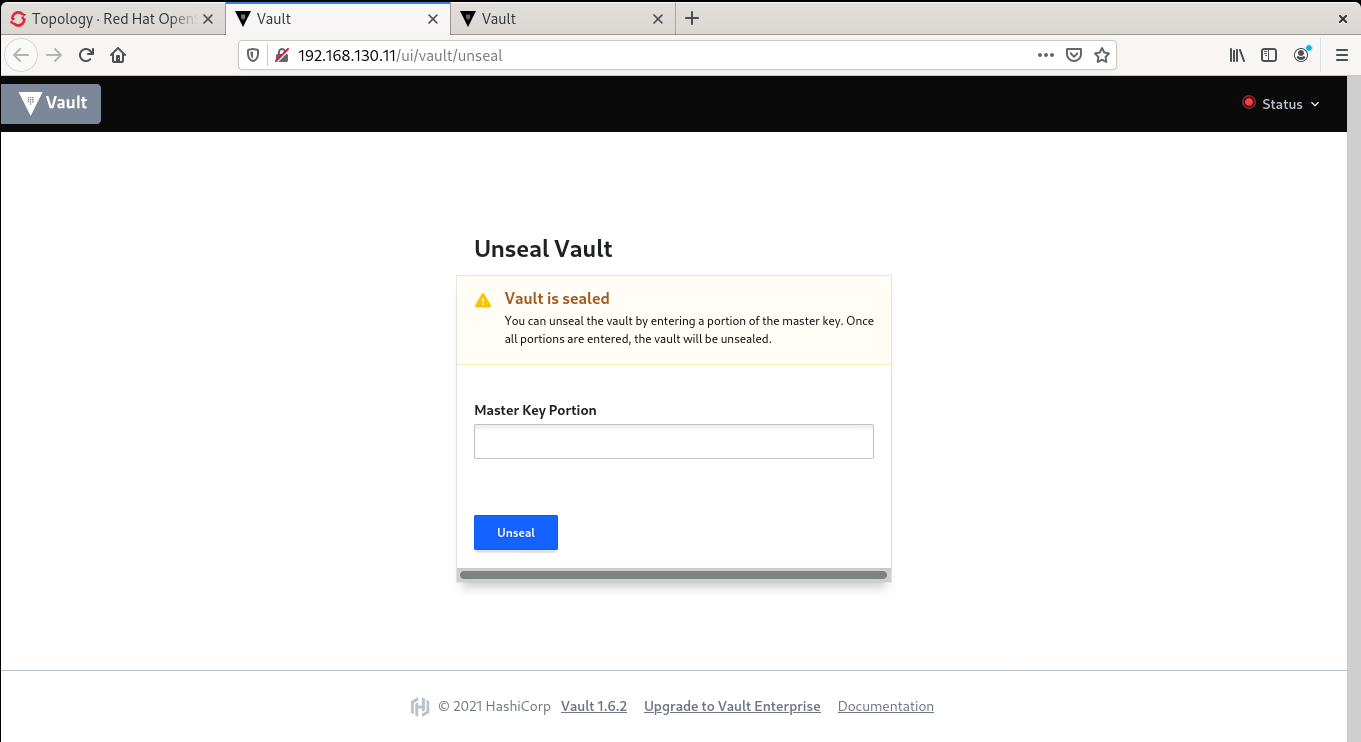
The UI is available.
In order to enable the https, I've followed the step here :
https://www.vaultproject.io/docs/platform/k8s/helm/examples/standalone-tls
But I've change the **K8S** commands for the **OpenShift** commands
```
# SERVICE is the name of the Vault service in Kubernetes.
# It does not have to match the actual running service, though it may help for consistency.
SERVICE=vault-server-tls
# NAMESPACE where the Vault service is running.
NAMESPACE=vault-project
# SECRET_NAME to create in the Kubernetes secrets store.
SECRET_NAME=vault-server-tls
# TMPDIR is a temporary working directory.
TMPDIR=/**tmp**
```
Then :
```
openssl genrsa -out ${TMPDIR}/vault.key 2048
```
Then create the **csr.conf** file :
```
[tim@localhost tmp]$ cat csr.conf
[req]
default_bits = 4096
default_md = sha256
distinguished_name = req_distinguished_name
x509_extensions = v3_req
prompt = no
[req_distinguished_name]
[v3_req]
keyUsage = keyEncipherment, dataEncipherment
extendedKeyUsage = serverAuth
subjectAltName = @alt_names
[alt_names]
DNS.1 = vault-project
DNS.2 = vault-project.vault-project
DNS.3 = *apps-crc.testing
DNS.4 = *api.crc.testing
IP.1 = 127.0.0.1
```
Create the **CSR** :
```
openssl
I try to run Vault with a CRC OpenShift 4.7 and helm3 but I've some problems when I try to enable the UI in https.
Add hashicorp repo :
```
helm repo add hashicorp https://helm.releases.hashicorp.com
```
Install the latest version of vault :
```
[[tim@localhost config]]$ helm install vault hashicorp/vault \
> --namespace vault-project \
> --set "global.openshift=true" \
> --set "server.dev.enabled=true"
```
Then I run `oc get pods`
```
[tim@localhost config]$ oc get pods
NAME READY STATUS RESTARTS AGE
vault-project-0 0/1 Running 0 48m
vault-project-agent-injector-8568dbf75d-4gjnw 1/1 Running 0 6h9m
```
I run an interactive shell session with the vault-0 pod :
```
oc rsh vault-project-0
```
Then I initialize Vault :
```
/ $ vault operator init --tls-skip-verify -key-shares=1 -key-threshold=1
Unseal Key 1: iE1iU5bnEsRPSkx0Jd5LWx2NMy2YH6C8bG9+Zo6/VOs=
Initial Root Token: s.xVb0DvIMQRYam7oS2C0ZsHBC
Vault initialized with 1 key shares and a key threshold of 1. Please securely
distribute the key shares printed above. When the Vault is re-sealed,
restarted, or stopped, you must supply at least 1 of these keys to unseal it
before it can start servicing requests.
Vault does not store the generated master key. Without at least 1 key to
reconstruct the master key, Vault will remain permanently sealed!
It is possible to generate new unseal keys, provided you have a quorum of
existing unseal keys shares. See "vault operator rekey" for more information.
```
Export the token :
```
export VAULT_TOKEN=s.xVb0DvIMQRYam7oS2C0ZsHBC
```
Unseal Vault :
```
/ $ vault operator unseal --tls-skip-verify iE1iU5bnEsRPSkx0Jd5LWx2NMy2YH6C8bG9+Zo6/VOs=
Key Value
--- -----
Seal Type shamir
Initialized true
Sealed false
Total Shares 1
Threshold 1
Version 1.6.2
Storage Type file
Cluster Name vault-cluster-21448fb0
Cluster ID e4d4649f-2187-4682-fbcb-4fc175d20a6b
HA Enabled false
```
I check the pods :
```
[tim@localhost config]$ oc get pods
NAME READY STATUS RESTARTS AGE
vault-project-0 1/1 Running 0 35m
vault-project-agent-injector-8568dbf75d-4gjnw 1/1 Running 0 35m
```
I'm able to get the UI without **https** :
In the OpenShift console, I switch to the **Administrator** mode and this is what I've done :
- Networking part
- Routes > Create routes
- Name : vault-route
- Hostname : 192.168.130.11
- Path :
- Service : vault
- Target Port : 8200 -> 8200 (TCP)
Now, if I check the URL : https://192.168.130.11/ui :

The UI is available.
In order to enable the https, I've followed the step here :
https://www.vaultproject.io/docs/platform/k8s/helm/examples/standalone-tls
But I've change the **K8S** commands for the **OpenShift** commands
```
# SERVICE is the name of the Vault service in Kubernetes.
# It does not have to match the actual running service, though it may help for consistency.
SERVICE=vault-server-tls
# NAMESPACE where the Vault service is running.
NAMESPACE=vault-project
# SECRET_NAME to create in the Kubernetes secrets store.
SECRET_NAME=vault-server-tls
# TMPDIR is a temporary working directory.
TMPDIR=/**tmp**
```
Then :
```
openssl genrsa -out ${TMPDIR}/vault.key 2048
```
Then create the **csr.conf** file :
```
[tim@localhost tmp]$ cat csr.conf
[req]
default_bits = 4096
default_md = sha256
distinguished_name = req_distinguished_name
x509_extensions = v3_req
prompt = no
[req_distinguished_name]
[v3_req]
keyUsage = keyEncipherment, dataEncipherment
extendedKeyUsage = serverAuth
subjectAltName = @alt_names
[alt_names]
DNS.1 = vault-project
DNS.2 = vault-project.vault-project
DNS.3 = *apps-crc.testing
DNS.4 = *api.crc.testing
IP.1 = 127.0.0.1
```
Create the **CSR** :
```
openssl
req -new -key': openssl req -new -key ${TMPDIR}/vault.key -subj "/CN=${SERVICE}.${NAMESPACE}.apps-crc.testing" -out ${TMPDIR}/server.csr -config ${TMPDIR}/csr.conf
```
Create the file ** **csr.yaml** :
```
$ export CSR_NAME=vault-csr
$ cat <<EOF >${TMPDIR}/csr.yaml
apiVersion: certificates.k8s.io/v1beta1
kind: CertificateSigningRequest
metadata:
name: ${CSR_NAME}
spec:
groups:
- system:authenticated
request: $(cat ${TMPDIR}/server.csr | base64 | tr -d '\n')
usages:
- digital signature
- key encipherment
- server auth
EOF
```
Send the CSR to OpenShfit :
```
oc create -f ${TMPDIR}/csr.yaml
```
Approve CSR :
```
oc adm certificate approve ${CSR_NAME}
```
Retrieve the certificate :
```
serverCert=$(oc get csr ${CSR_NAME} -o jsonpath='{.status.certificate}')
```
Write the certificate out to a file :
```
echo "${serverCert}" | openssl base64 -d -A -out ${TMPDIR}/vault.crt
```
Retrieve Openshift CA :
```
oc config view --raw --minify --flatten -o jsonpath='{.clusters[].cluster.certificate-authority-data}' | base64 -d > ${TMPDIR}/vault.ca
```
Store the key, cert, and OpenShift CA into Kubernetes secrets :
```
oc create secret generic ${SECRET_NAME} \
--namespace ${NAMESPACE} \
--from-file=vault.key=/home/vault/certs/vault.key \
--from-file=vault.crt=/home/vault/certs//vault.crt \
--from-file=vault.ca=/home/vault/certs/vault.ca
```
The command `oc get secret | grep vault ` :
```
NAME TYPE DATA AGE
vault-server-tls Opaque 3 4h15m
```
Edit my vault-config with the `oc edit cm vault-config` command:
```
# Please edit the object below. Lines beginning with a '#' will be ignored,
# and an empty file will abort the edit. If an error occurs while saving this file will be
# reopened with the relevant failures.
#
apiVersion: v1
data:
extraconfig-from-values.hcl: |-
disable_mlock = true
ui = true
listener "tcp" {
tls_cert_file = "/vault/certs/vault.crt"
tls_key_file = "/vault/certs/vault.key"
tls_client_ca_file = "/vault/certs/vault.ca"
address = "[::]:8200"
cluster_address = "[::]:8201"
}
storage "file" {
path = "/vault/data"
}
kind: ConfigMap
metadata:
creationTimestamp: "2021-03-15T13:47:24Z"
name: vault-config
namespace: vault-project
resourceVersion: "396958"
selfLink: /api/v1/namespaces/vault-project/configmaps/vault-config
uid: 844603a1-b529-4e33-9d58-20525ea7bff
```
Edit the **VolumeMounst**, **volumes** and **ADDR** parts my statefulset :
```
volumeMounts:
- mountPath: /home/vault
name: home
- mountPath: /vault/certs
name: certs
```
```
volumes:
- configMap:
defaultMode: 420
name: vault-config
name: config
- emptyDir: {}
name: home
- name: certs
secret:
defaultMode: 420
secretName: vault-server-tls
```
```
name: VAULT_ADDR
value: https://127.0.0.1:8200
```
I delete my pods in order to take into account all my changes
```
oc delete pods vault-project-0
```
And...
```
tim@localhost config]$ oc get pods
NAME READY STATUS RESTARTS AGE
vault-project-0 0/1 Running 0 48m
vault-project-agent-injector-8568dbf75d-4gjnw 1/1 Running 0 6h9m
```
vault-project-0 is on 0/1 but running. If I describe the pods :
```
Events:
Type Reason Age From Message
---- ------ ---- ---- -------
Warning Unhealthy 1s (x6 over 26s) kubelet Readiness probe failed: Error checking seal status: Get "https://127.0.0.1:8200/v1/sys/seal-status": http: server gave HTTP response to HTTPS client
```
If think that I've missed something but I don't know what...
Someone to tell me how to enable https for the vault UI with openshift
```
Create the file ** **csr.yaml** :
```
$ export CSR_NAME=vault-csr
$ cat <<EOF >${TMPDIR}/csr.yaml
apiVersion: certificates.k8s.io/v1beta1
kind: CertificateSigningRequest
metadata:
name: ${CSR_NAME}
spec:
groups:
- system:authenticated
request: $(cat ${TMPDIR}/server.csr | base64 | tr -d '\n')
usages:
- digital signature
- key encipherment
- server auth
EOF
```
Send the CSR to OpenShfit :
```
oc create -f ${TMPDIR}/csr.yaml
```
Approve CSR :
```
oc adm certificate approve ${CSR_NAME}
```
Retrieve the certificate :
```
serverCert=$(oc get csr ${CSR_NAME} -o jsonpath='{.status.certificate}')
```
Write the certificate out to a file :
```
echo "${serverCert}" | openssl base64 -d -A -out ${TMPDIR}/vault.crt
```
Retrieve Openshift CA :
```
oc config view --raw --minify --flatten -o jsonpath='{.clusters[].cluster.certificate-authority-data}' | base64 -d > ${TMPDIR}/vault.ca
```
Store the key, cert, and OpenShift CA into Kubernetes secrets :
```
oc create secret generic ${SECRET_NAME} \
--namespace ${NAMESPACE} \
--from-file=vault.key=/home/vault/certs/vault.key \
--from-file=vault.crt=/home/vault/certs//vault.crt \
--from-file=vault.ca=/home/vault/certs/vault.ca
```
The command `oc get secret | grep vault ` :
```
NAME TYPE DATA AGE
vault-server-tls Opaque 3 4h15m
```
Edit my vault-config with the `oc edit cm vault-config` command:
```
# Please edit the object below. Lines beginning with a '#' will be ignored,
# and an empty file will abort the edit. If an error occurs while saving this file will be
# reopened with the relevant failures.
#
apiVersion: v1
data:
extraconfig-from-values.hcl: |-
disable_mlock = true
ui = true
listener "tcp" {
tls_cert_file = "/vault/certs/vault.crt"
tls_key_file = "/vault/certs/vault.key"
tls_client_ca_file = "/vault/certs/vault.ca"
address = "[::]:8200"
cluster_address = "[::]:8201"
}
storage "file" {
path = "/vault/data"
}
kind: ConfigMap
metadata:
creationTimestamp: "2021-03-15T13:47:24Z"
name: vault-config
namespace: vault-project
resourceVersion: "396958"
selfLink: /api/v1/namespaces/vault-project/configmaps/vault-config
uid: 844603a1-b529-4e33-9d58-20525ea7bff
```
Edit the **VolumeMounst**, **volumes** and **ADDR** parts my statefulset :
```
volumeMounts:
- mountPath: /home/vault
name: home
- mountPath: /vault/certs
name: certs
```
```
volumes:
- configMap:
defaultMode: 420
name: vault-config
name: config
- emptyDir: {}
name: home
- name: certs
secret:
defaultMode: 420
secretName: vault-server-tls
```
```
name: VAULT_ADDR
value: https://127.0.0.1:8200
```
I delete my pods in order to take into account all my changes
```
oc delete pods vault-project-0
```
And...
```
tim@localhost config]$ oc get pods
NAME READY STATUS RESTARTS AGE
vault-project-0 0/1 Running 0 48m
vault-project-agent-injector-8568dbf75d-4gjnw 1/1 Running 0 6h9m
```
vault-project-0 is on 0/1 but running. If I describe the pods :
```
Events:
Type Reason Age From Message
---- ------ ---- ---- -------
Warning Unhealthy 1s (x6 over 26s) kubelet Readiness probe failed: Error checking seal status: Get "https://127.0.0.1:8200/v1/sys/seal-status": http: server gave HTTP response to HTTPS client
```
If think that I've missed something but I don't know what...
Someone to tell me how to enable https for the vault UI with openshift
Stop re-writing pipelines! Why GitHub Actions drive the future of CI/CD
The Pipeline-as-Code pattern is implemented by most CI/CD platforms today. So what could be the next evolutionary step? Based on GitHub Actions, the article outlines why open-source Pipeline-as-Code Building Blocks will take your pipelines to the next level.
Read more...
https://redd.it/m5n6it
@r_devops
The Pipeline-as-Code pattern is implemented by most CI/CD platforms today. So what could be the next evolutionary step? Based on GitHub Actions, the article outlines why open-source Pipeline-as-Code Building Blocks will take your pipelines to the next level.
Read more...
https://redd.it/m5n6it
@r_devops
codecentric AG
GitHub Actions: The Future of CI/CD Pipelines
GitHub Actions redefine CI/CD. Learn how open-source Pipeline-as-Code Building Blocks reduce boilerplate, ending pipeline re-writing.
Terraform or Pulumi or Crossplane or ... ?
Which IaC tool you prefer and why?
From my perspective, it's either Terraform (we know it works) or Crossplane (it's changing the game).
\>>> https://youtu.be/RaoKcJGchKM
https://redd.it/m6cnqm
@r_devops
Which IaC tool you prefer and why?
From my perspective, it's either Terraform (we know it works) or Crossplane (it's changing the game).
\>>> https://youtu.be/RaoKcJGchKM
https://redd.it/m6cnqm
@r_devops
YouTube
Terraform vs. Pulumi vs. Crossplane - Infrastructure as Code (IaC) Tools Comparison
Which Infrastructure as code (IaC) tool is the best? Is it Terraform, Pulumi, or Crossplane? Which one should you use?
▬▬▬▬▬▬ 🔗 Additional Info 🔗 ▬▬▬▬▬▬
➡ Gist with the commands: https://gist.github.com/80f3ddda660889bba078e4fc854d4c31
🎬 PPulumi - Infrastructure…
▬▬▬▬▬▬ 🔗 Additional Info 🔗 ▬▬▬▬▬▬
➡ Gist with the commands: https://gist.github.com/80f3ddda660889bba078e4fc854d4c31
🎬 PPulumi - Infrastructure…